NinjaOne Technician Permissions Reporter
It reads NinjaOne technician role permissions - the access definitions the public API does not expose - and turns them into one self-contained HTML report: a summary, an interactive role×permission matrix you can filter and compare, a diff against your previous run showing exactly what access changed and who changed it, plus CSV exports of the raw data. Run it whenever you want a check.
The gap
NinjaOne’s public REST API v2 does not expose role permission definitions, and the beta getTechnician operation returns only role names - never the per-role permission matrix. That matrix lives behind Administration → Accounts → Technician roles, a single-page app backed by NinjaOne’s internal JSON API. Without this tool there is no supported way to export technician access, diff it over time, or hand an auditor a record of who can do what. The tool reads that data through the same authenticated calls the web UI uses and turns it into a report.
What it does
Every capability below is something you can see in the report screenshots - there is no dashboard to host, no database, and no agent to deploy. Each run writes one HTML file you can open, archive, or email.

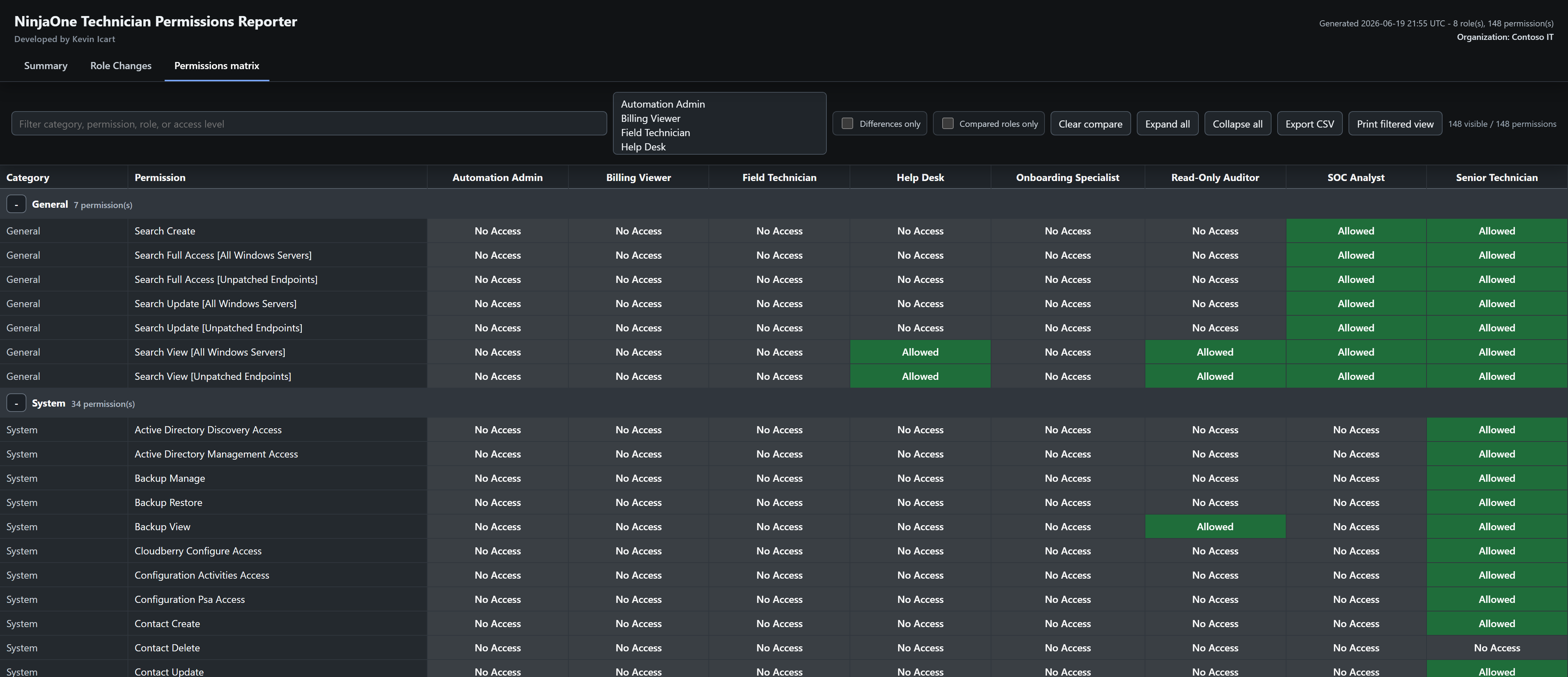
What it does: renders every technician role as a column and every permission as a row, with each cell showing Allowed or No Access.
What it gives you: a free-text filter (by category, permission, role, or access level), multi-role compare that outlines the selected columns, a “compared roles only” view, a “differences only” view, and a one-click CSV export of exactly what you have filtered to.

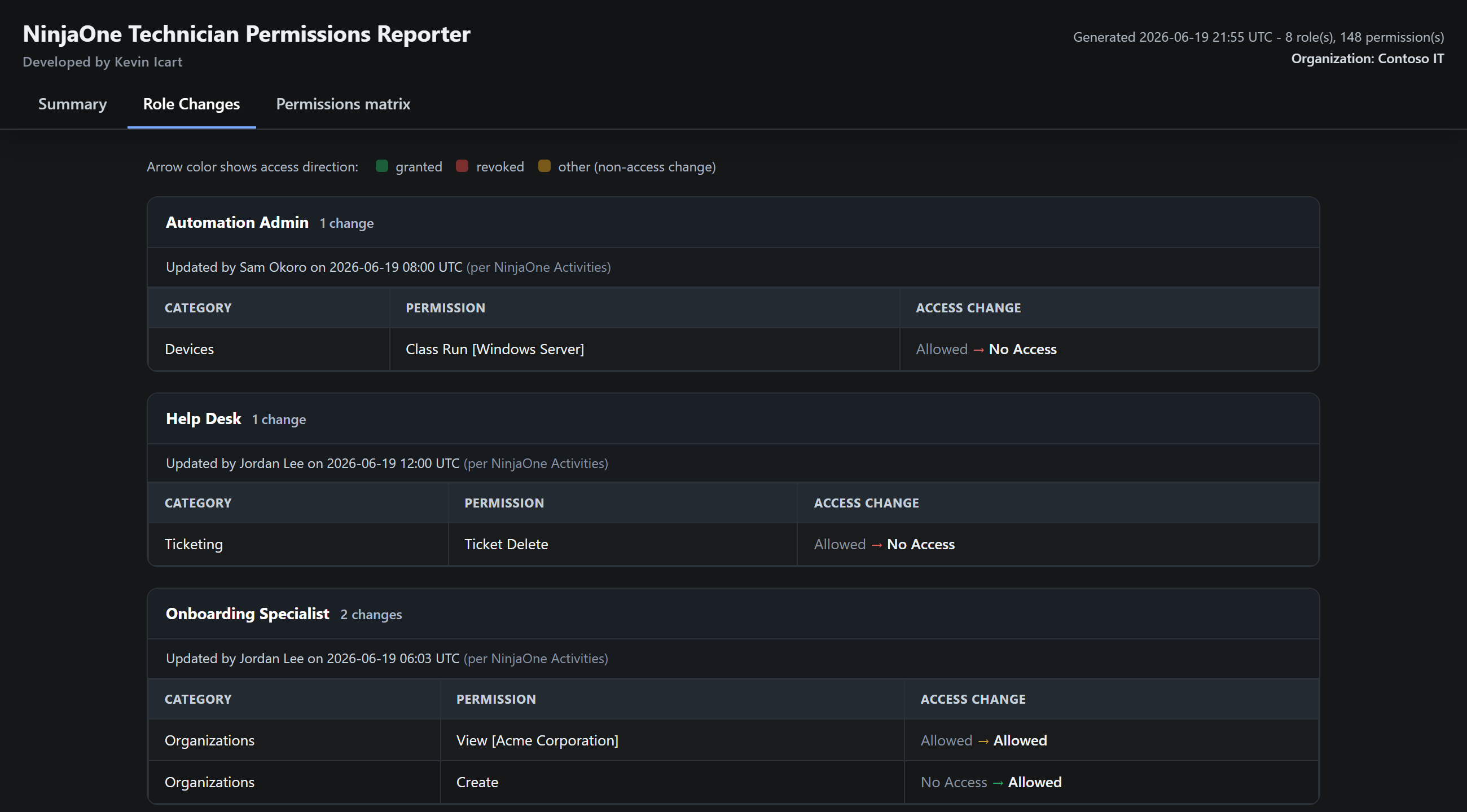
What it does: compares the run you just took against your previous run and lists every permission whose access changed, grouped by role.
What it gives you: each change shown as old → new with a direction-colored arrow - green for access granted, red for revoked, amber for a lateral change - so you can see at a glance whether a role gained or lost privilege.

What it does: for each role that changed, it reads the NinjaOne activity log and matches role-update events back to the role by its internal ID, so a rename does not break the link.
What it gives you: a “Updated by <person> on <date/time UTC>” line beside the change. This is role-level - the person to ask - not a claim about which exact permission they toggled.

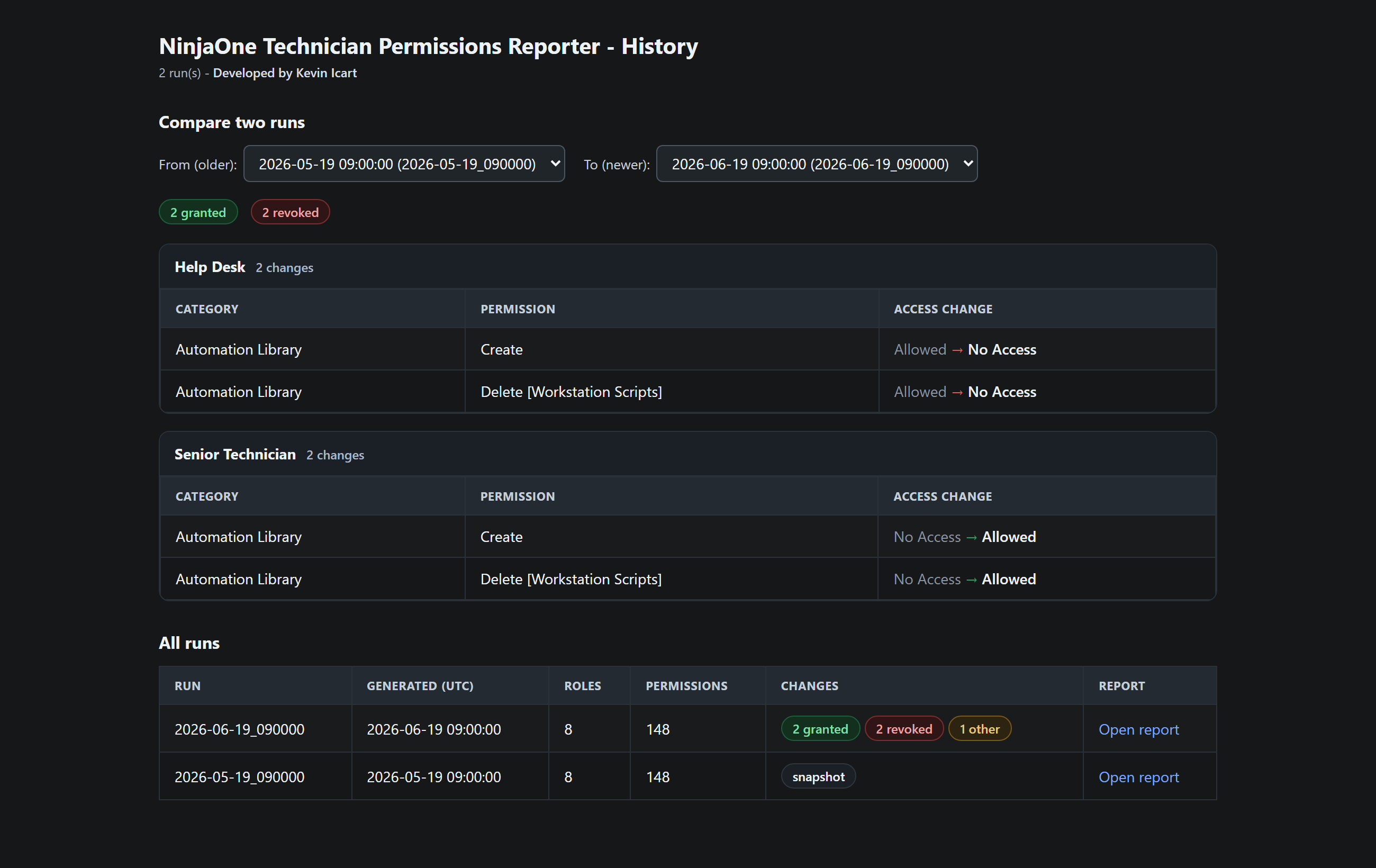
What it does: keeps every run in its own dated folder and builds an index page listing them newest-first.
What it gives you: a “compare two runs” panel - pick any two saved runs and the diff renders inline, grouped by role and color-coded. It works entirely offline, so you are not limited to comparing against just the previous run.
Inside the report
One run writes a timestamped folder under reports/ containing a single HTML report and a set of CSV exports. The report has three tabs.
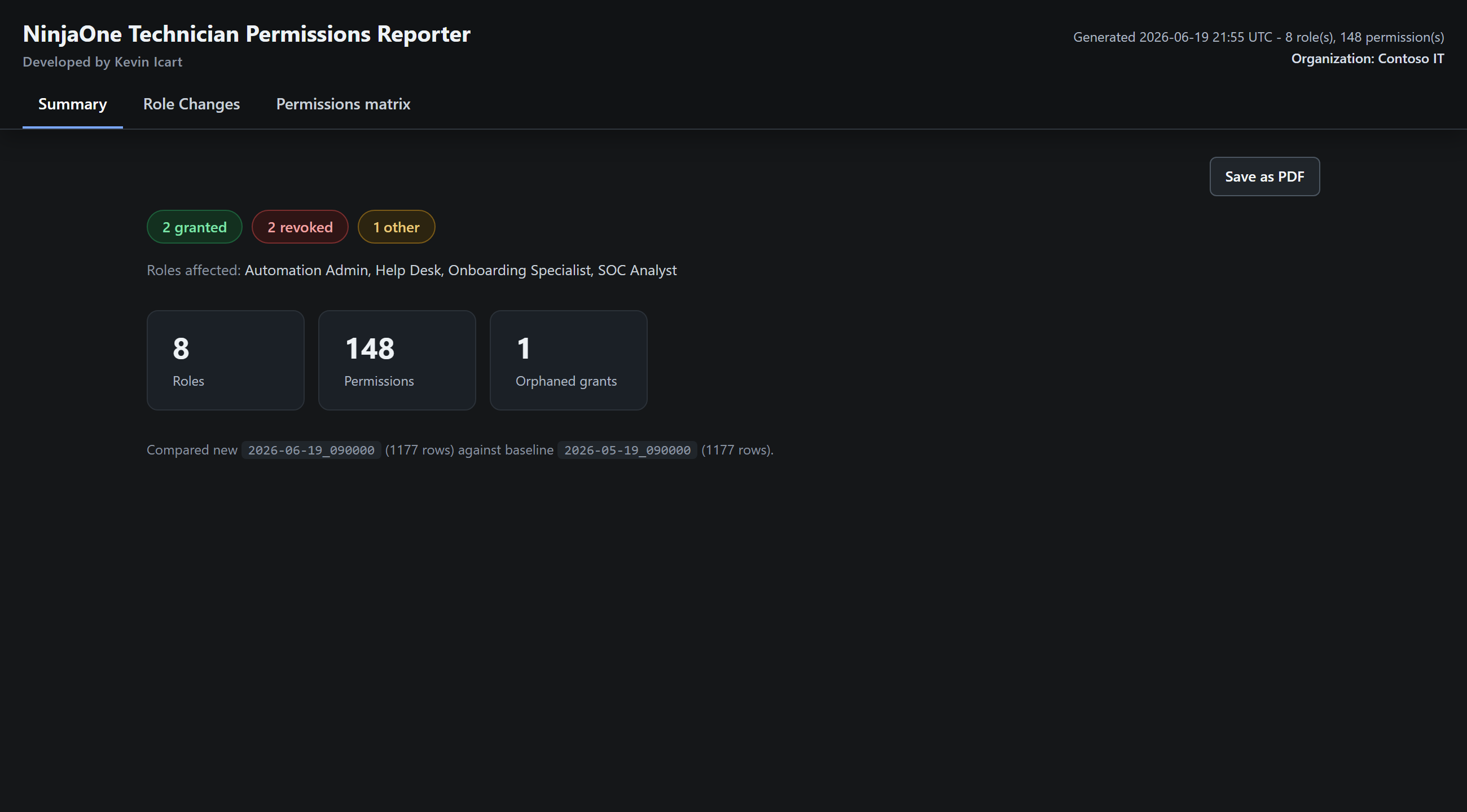
The landing view, and the first thing to read.
The detailed diff behind the banner.
old access → new access, with a color-coded direction arrow.The full, interactive role×permission grid (see the Inventory feature above for the filter, compare, differences-only, and CSV-export controls). Absent cells render as No Access so the differences-only view is exact, and a “Print filtered view” action saves the current filtered grid to a landscape PDF.
| File | Contents |
technician-role-audit.html | The consolidated report (Summary / Role Changes / Permissions matrix) - the one file to open. |
technician_roles.csv | One row per role permission entry: RoleName, RoleId, EntityType, EntityId, EntityName, EntityLookupStatus, PermissionKey, Category, Permission, AccessLevel. |
technician_roles_diff.csv | Only the rows that changed since the previous run, each an access transition. |
technician_roles_orphaned_scope_grants.csv | Scoped grants pointing at a deleted saved search or policy - a harmless but real cleanup item. |
reports/index.html | Regenerated every run: a history of all runs with the compare-two-runs panel. |
See it work
A screen recording of the actual report being driven against a fully fictional tenant - the change-tracking diff, filtering the matrix, comparing two roles side by side, and the differences-only view. Every click is a real control.
The tool writes two separate kinds of file, both real and interactive on fictional data here: a per-run report and a single history index that compares any two runs. Both open in a new tab.
How it works
Authenticate into an in-memory session, read the role permissions over GET requests, analyze the diff against your previous run, and write one consolidated report. Run it again whenever you want a fresh check - each run becomes the baseline for the next.
Extraction uses authenticated GET requests only. The single POST (activity/search, for who-changed-it attribution) is a read-only query that mutates nothing and can be skipped with --no-activity. The session is held in memory and logged out at the end - and the authoritative confirmation that nothing changed is NinjaOne’s own activity/audit log.
Trust & safety
NinjaOne has no view-only role for the Technician roles tab, so the account used to run the audit is effectively privileged. The design treats that as the threat model rather than ignoring it.
Authenticated GET requests only - no role editor, no UI clicks, no PUT/PATCH/DELETE. A network guard aborts any non-GET request during recon mode.
You sign in once per run; the session is held in memory only and never written to disk, then logged out server-side when the run finishes.
After any run, NinjaOne’s activity/audit log should show no change events - the authoritative confirmation that the tool made no edits.
Honest about scope. “Read-only” describes the data, not the connection. The tool changes no role permissions, but it does talk to the server: signing in and signing out alter session and audit-log state by design, and the attribution step issues one read-only search POST (skippable with --no-activity). Change attribution is role-level (who edited the role), not per-permission authorship, and the audit covers technician role templates rather than per-technician overrides or End-User roles.
In practice
Each audit is a single run on a Windows workstation. An operator with a NinjaOne sign-in that can open Administration → Accounts starts it; from there the tool works on its own and produces one report. Here is what a run does, end to end.
Inside a single run
The tool opens a browser at the NinjaOne sign-in page. The operator completes sign-in and MFA; the tool then captures that session in memory, closes the browser, and continues on its own. No password or MFA secret is ever stored.
Working from the in-memory session, it enumerates every technician role over read-only GET requests and pulls each role’s per-permission settings.
It diffs the result against the most recent prior run (absent counts as No Access), correlates who changed what from the activity log, then writes one self-contained HTML report plus its CSV exports and logs the session out.
Every run after the first
Each new run auto-selects the most recent prior run as its baseline and shows exactly what access changed since then, and who changed it. The very first run simply records a baseline.
The history view lists every run and renders the difference between any two of them inline, not just the latest pair.
app.ninjarmm.com.This walkthrough documents how the tool operates; it is not currently published for self-service use. The live sample report and run history below are the best way to see what a run produces.